
Oracle SQL · From the classroom
Oracle Recycle Bin. Why DROP TABLE doesn’t free the space.
When you drop a table without PURGE, Oracle renames it to a BIN$ name and moves it to the recycle bin, in the same tablespace. Oracle then reports that space as free, but the table is still there: FLASHBACK TABLE … TO BEFORE DROP brings it back until it is purged. Saurabh Joshi shows it in a live class.
- 73-second class
- Real SQL*Plus output
- Saurabh Joshi, SQL
- TEST_BIN
100 MBA tablespace that can autoextend, but only up to 100 MB - BIN_TABLE, BIN_TABLE2
36 MB eachTwo copies of a SALES table - Free before the drop
21.94 MBWhat user_free_space reports - Free after the drop
93.94 MBThe recycle bin still holds 72 MB of it
Filmed in a regular SQL class in our Dharampeth classroom; the drop times on the screen read 9 December 2025. Saurabh Sir still teaches in this room. The screen is bigger now.
Watch
The class, in 73 seconds
Saurabh Sir explains in Hinglish, as he teaches every day, with the commands on the screen behind him.
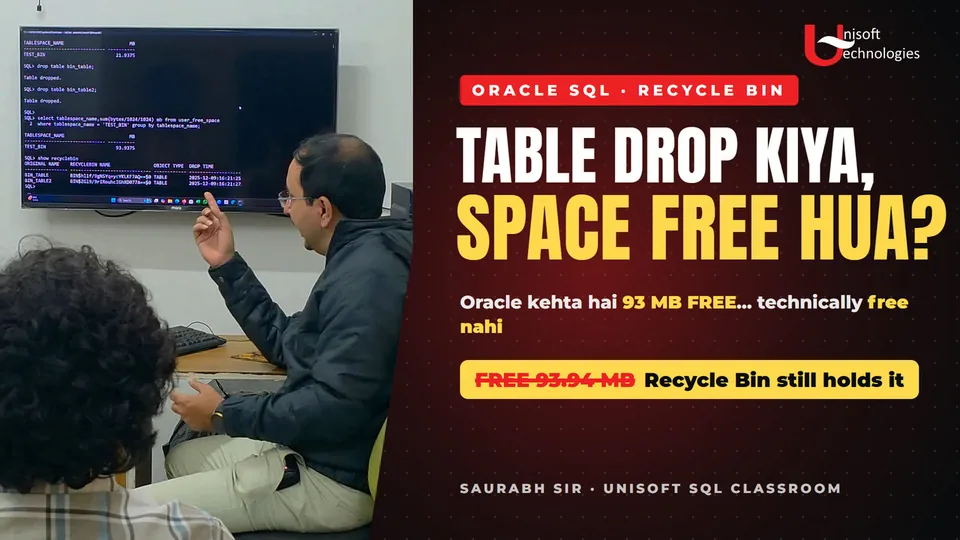
- No room for a third 36 MB table
- Autoextend on, but only up to 100 MB
- DROP TABLE, without PURGE
- Has the free space changed?
- Oracle says the space is free
- …but the recycle bin still holds it
- The tables, still in the recycle bin
- We can still flash it back
- 100 MB tablespace, 93 MB “free”
- And now a new 36 MB table?
Press a moment to play the class from there, or watch it on YouTube. Part 2 comes next: what Oracle does when a new table needs that space.
The class
What happened in class, step by step
The commands and output exactly as they appeared on the classroom screen.
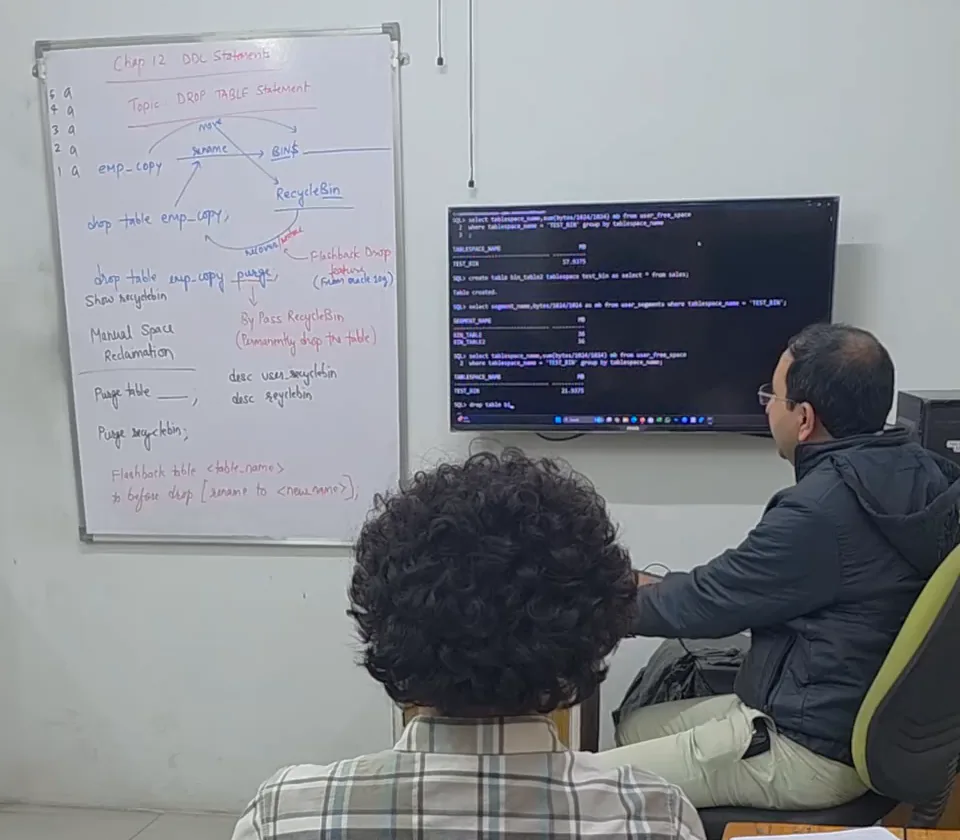
The lesson plan on the whiteboard
Chapter 12, DDL statements. The topic: the DROP TABLE statement, first on the board, then tried live on the screen.
- DROP TABLE renames the table to a
BIN$name and moves it to the recycle bin - Flashback Drop, the feature that brings it back (since Oracle 10g)
DROP TABLE … PURGEbypasses the recycle bin and drops the table permanentlySHOW RECYCLEBIN, andDESC USER_RECYCLEBIN- Manual space reclamation:
PURGE TABLEandPURGE RECYCLEBIN FLASHBACK TABLE name TO BEFORE DROP [RENAME TO new_name]
-
Fill the tablespace: two 36 MB tables
TEST_BIN is a 100 MB tablespace that can autoextend, but only up to 100 MB, so it cannot simply grow. Two copies of the SALES table take 36 MB each, and
user_free_spacereports 21.94 MB free. A third 36 MB table would not fit.SQL> create table bin_table2 tablespace test_bin as select * from sales; Table created. SQL> select segment_name,bytes/1024/1024 as mb from user_segments where tablespace_name = 'TEST_BIN'; SEGMENT_NAME MB ------------------------------ ---------- BIN_TABLE 36 BIN_TABLE2 36 SQL> select tablespace_name,sum(bytes/1024/1024) mb from user_free_space 2 where tablespace_name = 'TEST_BIN' group by tablespace_name; TABLESPACE_NAME MB ------------------------------ ---------- TEST_BIN 21.9375 -
Drop both tables, without PURGE
Without PURGE, DROP TABLE does not delete the table. Oracle renames it to a system-generated BIN$ name and moves it, with its indexes, triggers and constraints, into the recycle bin. That is the point of the exercise:
Purge nahi lagana hai, because recycle bin mein jaana chahiye.
(“Don’t add PURGE, because it should go to the recycle bin.”)SQL> drop table bin_table; Table dropped. SQL> drop table bin_table2; Table dropped. -
Oracle now says 93.94 MB is free
The same query now reports 93.94 MB free. The 72 MB the two tables still occupy is counted as free, because Oracle can take it back whenever it needs to.
Oracle is claiming ki itni jagah free hai. But technically itni jagah free nahi hai…
(“Oracle is claiming this much space is free. But technically, this much space is not free.”)SQL> select tablespace_name,sum(bytes/1024/1024) mb from user_free_space 2 where tablespace_name = 'TEST_BIN' group by tablespace_name; TABLESPACE_NAME MB ------------------------------ ---------- TEST_BIN 93.9375 -
The tables are still there
SHOW RECYCLEBIN lists both, under their BIN$ names, with the second each was dropped. Until they are purged, either one comes back with a single command:
FLASHBACK TABLE bin_table TO BEFORE DROP;SQL> show recyclebin ORIGINAL NAME RECYCLEBIN NAME OBJECT TYPE DROP TIME ---------------- ----------------- ------------ ------------------- BIN_TABLE BIN$…==$0 TABLE 2025-12-09:16:21:25 BIN_TABLE2 BIN$…==$0 TABLE 2025-12-09:16:21:27Recycle bin names are shortened here. Oracle gives every dropped object its own unique BIN$ name.
The question for Part 2
A 100 MB tablespace, 93 MB “free”, only 21.94 MB actually empty, and a new 36 MB table. What should happen?
Oracle’s documentation gives the rule: under space pressure it purges recycle bin objects, the first dropped first, and only as many as it needs, before it extends an autoextend datafile. Part 2 shows it happening in the same class. Read Oracle’s rule
Commands
The recycle bin commands, in one place
Standard Oracle SQL, with the table names from the class. SHOW RECYCLEBIN is a SQL*Plus command; elsewhere, query the RECYCLEBIN view.
| What you want | The command |
|---|---|
| See what you have dropped (SQL*Plus) | SHOW RECYCLEBIN |
| The same, as a query | SELECT object_name, original_name, droptime FROM recyclebin; |
| Bring a table back | FLASHBACK TABLE bin_table TO BEFORE DROP; |
| Bring it back under a new name | FLASHBACK TABLE bin_table TO BEFORE DROP RENAME TO bin_table_old; |
| Drop a table for good, skipping the bin | DROP TABLE bin_table PURGE; |
| Remove one table from the bin | PURGE TABLE bin_table; |
| Empty your own recycle bin | PURGE RECYCLEBIN; |
| Remove everything a tablespace holds in the bin | PURGE TABLESPACE test_bin; |
| Turn the bin off for your session | ALTER SESSION SET recyclebin = OFF; |
Sources: Oracle’s Managing Tables (Database Administrator’s Guide, 19c), Oracle Flashback Drop and FLASHBACK TABLE.
FAQ
What students ask about the recycle bin
Does DROP TABLE free the space in Oracle?
Not straight away. Without PURGE, the table moves to the recycle bin and keeps its space. Oracle’s free-space views count that space as free, because Oracle can reclaim it when it runs short, but until then the table can still be restored. In this class, free space went from 21.94 MB to 93.94 MB while both tables sat in the recycle bin.
How do I restore a dropped table?
Run FLASHBACK TABLE table_name TO BEFORE DROP; while it is still in the recycle bin. Add RENAME TO new_name if a new table already uses the old name. If several dropped tables share the name, Oracle brings back the most recently dropped one; to get an older one, use its BIN$ name from SHOW RECYCLEBIN.
How do I drop a table permanently?
Use DROP TABLE table_name PURGE;, which skips the recycle bin, so the table cannot be flashed back. For a table already in the bin, PURGE TABLE table_name; removes it, and PURGE RECYCLEBIN; empties your whole recycle bin.
When does Oracle empty the recycle bin by itself?
Only under space pressure: when a tablespace needs space for new data and has none left without growing, or a user’s quota runs out. Oracle then purges the objects that were dropped first, only as many as it needs, and in an autoextend tablespace it does this before it extends the datafile.
Do the indexes and constraints come back too?
Mostly. Indexes, triggers and constraints go into the bin with the table and come back with it, but restored indexes keep their BIN$ names, so rename them with ALTER INDEX "BIN$…" RENAME TO …. Foreign key constraints are not kept; re-create them. An index Oracle has already purged for space does not come back; rebuild it.
Is the recycle bin always on?
It is on by default, and ALTER SESSION SET recyclebin = OFF; turns it off for your session. It protects tables in non-system, locally managed tablespaces only, so a table dropped from the SYSTEM tablespace is gone for good.
Still have a question? Ask a counsellor about the course, the batches or the fee.
Transcript
What Saurabh Sir says
As spoken, in Hinglish, with an English translation beside each line. Press a time to play from there.
- 0:03
Try karoge one more table, 36 MB ki jagah hai nahi.
Try one more table, and there's no room for 36 MB.
- 0:07
Lekin kyunki humne autoextend on rakha hai,
But because we've kept autoextend on,
- 0:09
autoextend ho jayega,
it would just autoextend,
- 0:10
woh toh pura practical fail ho jayega.
and that would make the whole practical fail.
- 0:13
Because 100 MB ke upar nahi jaane de rahe.
Because we're not letting it grow beyond 100 MB.
- 0:15
Toh hum table ko drop karne ki koshish karenge.
So we'll try dropping the table.
- 0:17
Drop table bin underscore table.
DROP TABLE BIN_TABLE.
- 0:20
Purge nahi lagana hai, because recycle bin mein jaana chahiye.
Don't add PURGE, because it should go to the recycle bin.
- 0:23
Toh yeh bhi recycle bin mein gaya, yeh bhi recycle bin mein gaya.
So this one went to the recycle bin, and so did this one.
- 0:26
Dono table recycle bin mein chale gaye.
Both tables have gone to the recycle bin.
- 0:27
Abhi yeh wali query chala ke dekhte hain
Now let's run this query and see
- 0:29
ki free space mein koi badlav hua hai kya.
whether the free space has changed.
- 0:33
Free space badh gayi hai.
The free space has gone up.
- 0:34
Because Oracle is claiming ki itni jagah free hai.
Because Oracle is claiming that this much space is free.
- 0:36
But technically itni jagah free nahi hai,
But technically, this much space is not free,
- 0:38
kyunki recycle bin still holds the object.
because the recycle bin still holds the object.
- 0:41
So if you run this,
So if you run this,
- 0:45
yeh object bhi gaya nahi hai, we can still flashback.
this object hasn't gone either. We can still flash it back.
- 0:48
Toh saara khel kya hai,
So here's the whole game:
- 0:49
ki 100 MB ki tablespace mein 93 MB free hai, as per Oracle.
in a 100 MB tablespace, 93 MB is free, as per Oracle.
- 0:54
Aur agar main try karun to create one more new table,
And if I try to create one more new table,
- 0:57
which will obviously take 36 MB,
which will obviously take 36 MB,
- 0:59
and you technically do not have that much space,
and technically you do not have that much space,
- 1:02
so what should happen?
so what should happen?
- 1:03
Ek object jo pehle drop hua tha…
An object that was dropped earlier…
Your trainer
Saurabh Joshi

Saurabh Joshi has taught at Unisoft since 17 May 2010, 16 years now. He teaches SQL and PL/SQL, Advanced Excel and data analytics, and is Unisoft’s CTO. His six Credly badges include Oracle Database SQL Certified Associate.
This clip is how his classes run: the lesson plan on the whiteboard first, then the same idea tried live in SQL*Plus, with the real output on the screen.
- Oracle SQL certified
- 16+ years of teaching
- SQL · Excel · Tableau
In his students’ words
From Unisoft’s Google listing, as the students wrote them. Each card opens the review on Google.
Saurabh Joshi sir is my oracle SQL trainer, he is highly knowledgeable person with 15 years of teaching experience. Sir's experience and knowledge tells a lot about him , it's just like they know answer of every question. …
★★★★★ Aditi Mahurkar · Oracle SQL · Read it on Google …Attended sql12c training taken by mr.saurabh joshi, very experienced trainer explains concepts very well. Saurabh sir is very motivating . he was the best teacher unisoft have. …
★★★★ RCreation · SQL 12c · Read it on Google Saurabh Joshi sir for SQL is the best trainer.. and he is always motivate and co-operate with us and he changed my mind set and always said that you can do any thing only work hard...
★★★★★ EKTA GUPTA · SQL · Read it on Google
Next step
Learn SQL in this classroom
Leave your number and a counsellor will call you to fix a demo class with Saurabh Sir, in Dharampeth or online. Ask him anything about the course.
- See how Saurabh Sir teaches before you join
- The SQL syllabus, from the first query to PL/SQL
- The current fee, duration and next batch
Visit us in Dharampeth
Unisoft Technologies, 2nd Floor, Prananand Building, West High Court Road, above Anand Bhandar, opposite Dress Code, Dharampeth, Nagpur 4400104.6 on Google from 1,600+ reviews · Directions and reviews