
DELETE vs TRUNCATE vs SHRINK SPACE: what each one does to an Oracle table
In my SQL class on 26 November I deleted 3,072 of a table’s 7,168 rows. Oracle still said the table filled 53 blocks. Here is why, what TRUNCATE and SHRINK SPACE do instead, and the exact output from my screen, on Oracle AI Database 26ai.

Oracle SQL faculty and CTO, Unisoft Technologies, Nagpur. Teaching since 2010.
, about 25 minutes to read
Each page is one 8 KB block of the table, and each ink line about 15 rows. The red ribbon is the high-water mark. Drag to turn it.
The short answer
- DELETE removes the rows you choose. You can roll it back, and the table keeps every block it had.
- TRUNCATE removes every row at once. It commits, it cannot be rolled back, and it gives the space back, keeping only the table’s first extent by default.
- SHRINK SPACE packs the remaining rows together and returns the empty space, while people keep working on the table.
- DROP TABLE removes the table itself. Without PURGE it waits in the recycle bin.
Some rows: DELETE. All rows: TRUNCATE. A big DELETE left the table bloated: SHRINK SPACE.
What happened in my class
Chapter 12 of my SQL course is DDL: CREATE, ALTER, DROP and TRUNCATE. Most courses give TRUNCATE one line in a comparison table. I wanted my batch to see it, so on 26 November 2026 we built a table and watched it from the inside.
We copied SCOTT’s EMP table, 14 rows, and doubled it nine times with INSERT ... SELECT until it held 7,168 rows. After every step I asked Oracle how many blocks the table used. Then I deleted every employee of department 30: 3,072 rows, gone in a hundredth of a second.
After fresh statistics, Oracle’s answer was 4,096 rows in 53 blocks. The same 53 blocks as before the DELETE.
SQL> set timing on
SQL> delete from emp_copy where deptno = 30;

3072 rows deleted.

Elapsed: 00:00:00.01
SQL> commit;

Commit complete.

SQL> analyze table emp_copy compute statistics;

Table analyzed.

Elapsed: 00:00:00.05
SQL> select num_rows,blocks,empty_blocks from user_tables where table_name = 'EMP_COPY';

  NUM_ROWS     BLOCKS EMPTY_BLOCKS
---------- ---------- ------------
      4096         53            3
That gap, between the rows a table holds and the blocks it keeps, is the high-water mark. Once you can see it, DELETE, TRUNCATE and SHRINK SPACE stop being three lines to memorise for an interview.
The class ran on Oracle AI Database 26ai Free, release 23.26.0, on my classroom PC. I ran the same steps again on my laptop (26ai Free 23.26.3) with a test script, and every USER_TABLES number came out the same.
The high-water mark, explained with an attendance register
The high-water mark (HWM) is the boundary in a table’s segment between the blocks that have held data and the blocks that never have. A full table scan reads the blocks below it, whether they still hold rows or not, and Oracle never moves it back on its own.
- Strike names out and the pages stay. Taking attendance still means turning every page up to the ribbon. That is DELETE, and why a full scan is no faster after it.
- Write a new admission into a gap and you use space on a page you already have. That is an ordinary INSERT reusing free space.
- Copy names from the back pages into the gaps at the front while the class carries on, then move the ribbon back and return the empty bundles to the stationery cupboard. That is SHRINK SPACE, and the cupboard is the tablespace.
- Start the new term with an empty register, keeping only the first bundle of pages. That is TRUNCATE.
- Throw the register in the dustbin. That is DROP TABLE, and in Oracle the dustbin is the recycle bin, so you can still pull it out.
“Unless you manually rebuild, truncate, or shrink the object, the HWM never retreats.”
Oracle AI Database Concepts, 26ai
One detail for later: in a tablespace with automatic segment space management (ASSM, the default), Oracle keeps a low and a high mark. A full scan reads every block below the low one, and between the two it reads only the blocks that have been formatted. On my laptop the USERS tablespace, where these test tables live, is exactly that: 8 KB blocks, ASSM, extent sizes chosen by Oracle.
Replay the class, block by block
Step through my session. On one side, the commands and Oracle’s replies exactly as they came; on the other, every block of the table, with its ink showing how full it is. The block-by-block picture comes from the same steps re-run on my laptop, where every number matched the class.
- A block with rows
- Oracle’s own block
- Never used
- High-water mark
1. Copy SCOTT’s EMP table
CREATE TABLE ... AS SELECT gave us 14 rows. USER_TABLES had numbers before I gathered anything: since Oracle 12c a CREATE TABLE AS SELECT gathers statistics while it loads. EMPTY_BLOCKS stayed 0 until ANALYZE filled it in: 4 blocks below the high-water mark and 4 above it. That is one 64 KB extent of eight 8 KB blocks.
SQL> drop table emp_copy purge;

Table dropped.

SQL> create table emp_copy as select * from scott.emp;

Table created.

SQL> select num_rows,blocks,empty_blocks from user_tables where table_name = 'EMP_COPY';

  NUM_ROWS     BLOCKS EMPTY_BLOCKS
---------- ---------- ------------
        14          4            0

SQL> analyze table emp_copy compute statistics;

Table analyzed.

SQL> select num_rows,blocks,empty_blocks from user_tables where table_name = 'EMP_COPY';

  NUM_ROWS     BLOCKS EMPTY_BLOCKS
---------- ---------- ------------
        14          4            4
2. Double it, nine times
Each INSERT ... SELECT copied the table into itself. The high-water mark does not creep forward one block at a time: at 28 rows it had already moved past the whole first extent, though 28 rows fit in one block. New 64 KB extents arrived as the table needed them.
| NUM_ROWS | BLOCKS | EMPTY_BLOCKS |
|---|---|---|
| 14 | 4 | 4 |
| 28 | 8 | 0 |
| 56 | 8 | 0 |
| 112 | 8 | 0 |
| 224 | 8 | 0 |
| 448 | 8 | 0 |
| 896 | 16 | 0 |
| 1,792 | 16 | 0 |
| 3,584 | 31 | 1 |
| 7,168 | 53 | 3 |
SQL> insert into emp_copy select * from emp_copy;

14 rows created.

SQL> analyze table emp_copy compute statistics;

Table analyzed.

SQL> select num_rows,blocks,empty_blocks from user_tables where table_name = 'EMP_COPY';

  NUM_ROWS     BLOCKS EMPTY_BLOCKS
---------- ---------- ------------
        28          8            0

   ...  (seven more doublings)

SQL> insert into emp_copy select * from emp_copy;

3584 rows created.

SQL> analyze table emp_copy compute statistics;

Table analyzed.

SQL> select num_rows,blocks,empty_blocks from user_tables where table_name = 'EMP_COPY';

  NUM_ROWS     BLOCKS EMPTY_BLOCKS
---------- ---------- ------------
      7168         53            3
3. Look at the extents
USER_EXTENTS lists the space the table owns: 7 extents of 64 KB, 56 blocks in all. On my laptop, DBA_EXTENTS placed the seven extents side by side, blocks 81,872 to 81,927, and DBMS_ROWID showed where the rows really sat: 44 blocks, about 170 rows each, for an average row of 40 bytes. The dark pages are Oracle’s own blocks, the segment header and the space-management maps; the last few pages were formatted but still empty.
SQL> desc user_extents
 Name            Null?    Type
 --------------- -------- -------------
 SEGMENT_NAME             VARCHAR2(128)
 PARTITION_NAME           VARCHAR2(128)
 SEGMENT_TYPE             VARCHAR2(18)
 TABLESPACE_NAME          VARCHAR2(30)
 EXTENT_ID                NUMBER
 BYTES                    NUMBER
 BLOCKS                   NUMBER

SQL> select extent_id,bytes/1024 as kb,blocks from user_extents where segment_name = 'EMP_COPY';

 EXTENT_ID         KB     BLOCKS
---------- ---------- ----------
         0         64          8
         1         64          8
         2         64          8
         3         64          8
         4         64          8
         5         64          8
         6         64          8

7 rows selected.
4. DELETE department 30
3,072 rows deleted in a hundredth of a second, and committed. USER_EXTENTS: still 7 extents. USER_TABLES still said 7,168 rows, because it shows the last statistics gathered, not the live table. Department 30’s rows were spread through every block, so every page lost names and not one page became free.
SQL> select count(*) from emp_copy where deptno = 30;

  COUNT(*)
----------
      3072

SQL> set timing on
SQL> delete from emp_copy where deptno = 30;

3072 rows deleted.

Elapsed: 00:00:00.01
SQL> commit;

Commit complete.

Elapsed: 00:00:00.03
SQL> select extent_id,bytes/1024 as kb,blocks from user_extents where segment_name = 'EMP_COPY';

 EXTENT_ID         KB     BLOCKS
---------- ---------- ----------
         0         64          8
         1         64          8
         2         64          8
         3         64          8
         4         64          8
         5         64          8
         6         64          8

7 rows selected.

Elapsed: 00:00:00.01
SQL> select num_rows,blocks,empty_blocks from user_tables where table_name = 'EMP_COPY';

  NUM_ROWS     BLOCKS EMPTY_BLOCKS
---------- ---------- ------------
      7168         53            3
5. Gather the statistics again
Now USER_TABLES agrees: 4,096 rows. And still 53 blocks below the high-water mark. On my laptop every block held about 97 rows where it had held 170, and the average free space in a block went from 1,977 to 4,568 bytes. A full scan still reads every one of those blocks.
SQL> analyze table emp_copy compute statistics;

Table analyzed.

Elapsed: 00:00:00.05
SQL> select num_rows,blocks,empty_blocks from user_tables where table_name = 'EMP_COPY';

  NUM_ROWS     BLOCKS EMPTY_BLOCKS
---------- ---------- ------------
      4096         53            3
6. SHRINK SPACE COMPACT
ENABLE ROW MOVEMENT lets Oracle give rows new ROWIDs. COMPACT then moves rows from the back of the table into the gaps at the front, while people keep working on it. The high-water mark stays where it was, still 53 blocks, and no extent is released yet.
SQL> alter table emp_copy enable row movement;

Table altered.

Elapsed: 00:00:00.01
SQL> alter table emp_copy shrink space compact;

Table altered.

Elapsed: 00:00:00.06
SQL> select num_rows,blocks,empty_blocks from user_tables where table_name = 'EMP_COPY';

  NUM_ROWS     BLOCKS EMPTY_BLOCKS
---------- ---------- ------------
      4096         53            3

Elapsed: 00:00:00.01
SQL> select extent_id,bytes/1024 as kb,blocks from user_extents where segment_name = 'EMP_COPY';

 EXTENT_ID         KB     BLOCKS
---------- ---------- ----------
         0         64          8
         1         64          8
         2         64          8
         3         64          8
         4         64          8
         5         64          8
         6         64          8

7 rows selected.

Elapsed: 00:00:00.01
SQL> analyze table emp_copy compute statistics;

Table analyzed.

Elapsed: 00:00:00.04
SQL> select num_rows,blocks,empty_blocks from user_tables where table_name = 'EMP_COPY';

  NUM_ROWS     BLOCKS EMPTY_BLOCKS
---------- ---------- ------------
      4096         53            3
7. SHRINK SPACE
The second command finishes the job: it moves the high-water mark back and returns the empty extents to the tablespace. Seven extents became four, and 4,096 rows now sit in 25 blocks, about 176 to a block. I ran COMPACT once more out of habit; with nothing left to pack it changed nothing, and on my laptop, without it, the answer was the same 25 blocks. There a COUNT(*) now read 27 blocks instead of 52.
SQL> alter table emp_copy shrink space;

Table altered.

Elapsed: 00:00:00.02
SQL> select num_rows,blocks,empty_blocks from user_tables where table_name = 'EMP_COPY';

  NUM_ROWS     BLOCKS EMPTY_BLOCKS
---------- ---------- ------------
      4096         53            3

Elapsed: 00:00:00.01
SQL> select extent_id,bytes/1024 as kb,blocks from user_extents where segment_name = 'EMP_COPY';

 EXTENT_ID         KB     BLOCKS
---------- ---------- ----------
         0         64          8
         1         64          8
         2         64          8
         3         64          8

Elapsed: 00:00:00.01
SQL> alter table emp_copy shrink space compact;

Table altered.

Elapsed: 00:00:00.01
SQL> analyze table emp_copy compute statistics;

Table analyzed.

Elapsed: 00:00:00.04
SQL> select num_rows,blocks,empty_blocks from user_tables where table_name = 'EMP_COPY';

  NUM_ROWS     BLOCKS EMPTY_BLOCKS
---------- ---------- ------------
      4096         25            7
8. Three more copies, and a mistake
EMP_COPY1 and EMP_COPY2 are plain copies: four extents each. For EMP_COPY3 I wanted MINEXTENTS 2 and put the STORAGE clause in brackets: ORA-03099. Brackets after a table name hold its column list. Without them it worked, and Oracle gave the table two 1 MB extents: it turned MINEXTENTS 2 into a starting size of 64 KB plus one 1 MB next extent, 1,114,112 bytes.
SQL> create table emp_copy1 as select * from emp_copy;

Table created.

Elapsed: 00:00:00.05
SQL> create table emp_copy2 as select * from emp_copy;

Table created.

Elapsed: 00:00:00.03
SQL>
SQL> create table emp_copy3 (storage minextents 2) as select * from emp_copy;
create table emp_copy3 (storage minextents 2) as select * from emp_copy
                                           *
ERROR at line 1:
ORA-03099: unexpected item 2 in a column definition
Help: https://docs.oracle.com/error-help/db/ora-03099/


Elapsed: 00:00:00.00
SQL> create table emp_copy3 storage( minextents 2) as select * from emp_copy;

Table created.

Elapsed: 00:00:00.30
SQL> select extent_id,bytes/1024 as kb,blocks from user_extents where segment_name = 'EMP_COPY';

 EXTENT_ID         KB     BLOCKS
---------- ---------- ----------
         0         64          8
         1         64          8
         2         64          8
         3         64          8

Elapsed: 00:00:00.01
SQL> select extent_id,bytes/1024 as kb,blocks from user_extents where segment_name = 'EMP_COPY1';

 EXTENT_ID         KB     BLOCKS
---------- ---------- ----------
         0         64          8
         1         64          8
         2         64          8
         3         64          8

Elapsed: 00:00:00.18
SQL> select extent_id,bytes/1024 as kb,blocks from user_extents where segment_name = 'EMP_COPY2';

 EXTENT_ID         KB     BLOCKS
---------- ---------- ----------
         0         64          8
         1         64          8
         2         64          8
         3         64          8

Elapsed: 00:00:00.18
SQL> select extent_id,bytes/1024 as kb,blocks from user_extents where segment_name = 'EMP_COPY3';

 EXTENT_ID         KB     BLOCKS
---------- ---------- ----------
         0       1024        128
         1       1024        128
9. TRUNCATE TABLE emp_copy
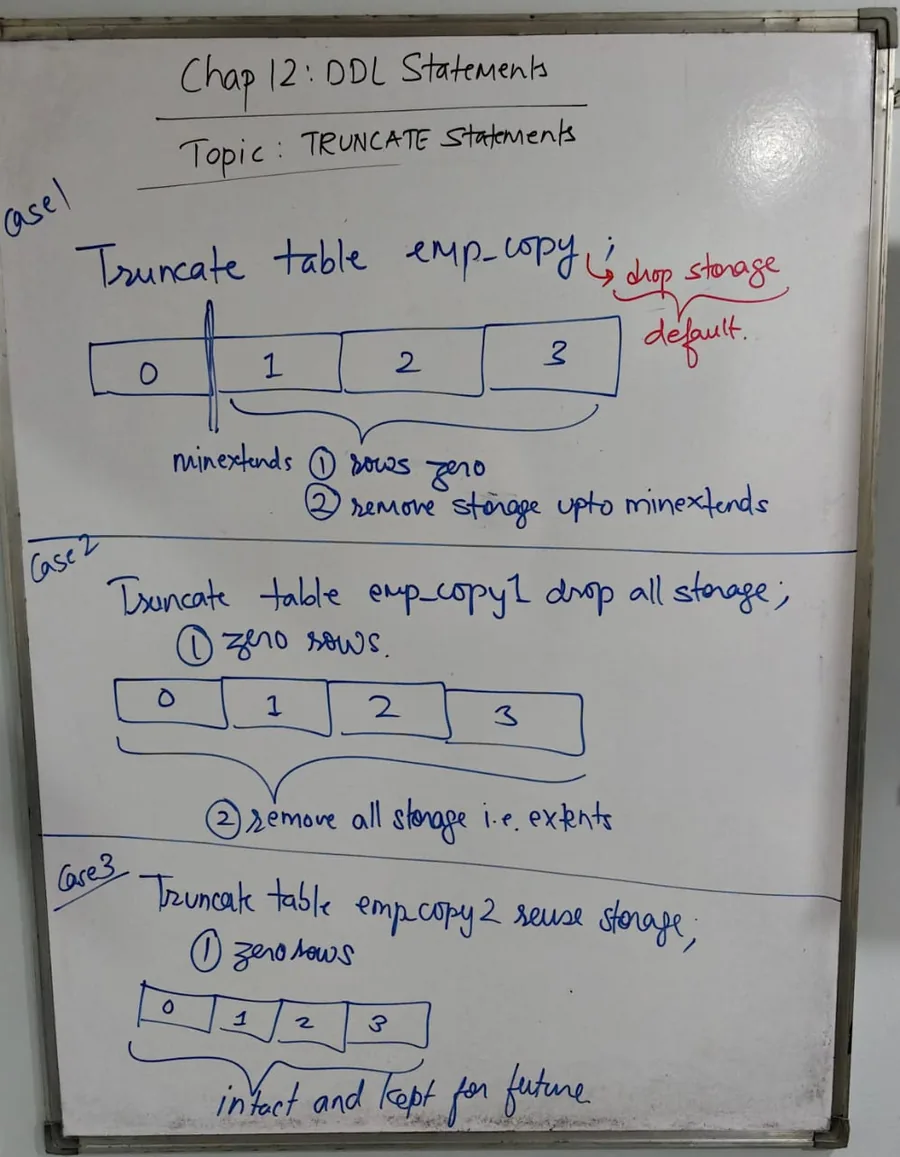
The default is DROP STORAGE: every row goes, and every extent goes back to the tablespace except the space the table started with. For EMP_COPY that is one extent, 64 KB. The high-water mark is back at the start.
SQL> truncate table emp_copy;

Table truncated.

Elapsed: 00:00:00.02
SQL> select count(*) from emp_copy;

  COUNT(*)
----------
         0

Elapsed: 00:00:00.00
SQL> select extent_id,bytes/1024 as kb,blocks from user_extents where segment_name = 'EMP_COPY';

 EXTENT_ID         KB     BLOCKS
---------- ---------- ----------
         0         64          8
10. TRUNCATE ... DROP ALL STORAGE
DROP ALL STORAGE returns even the first extent: USER_EXTENTS has no rows for EMP_COPY1. The table is still there, with no segment at all, until the next INSERT creates one.
SQL> truncate table emp_copy1 drop all storage;

Table truncated.

Elapsed: 00:00:00.02
SQL> select extent_id,bytes/1024 as kb,blocks from user_extents where segment_name = 'EMP_COPY1';

no rows selected

Elapsed: 00:00:00.00
SQL> select count(*) from emp_copy1;

  COUNT(*)
----------
         0
11. TRUNCATE ... REUSE STORAGE
REUSE STORAGE empties the table and resets the high-water mark, but keeps all four extents for this table’s next load. No other table can use that space.
SQL> truncate table emp_copy2 reuse storage;

Table truncated.

Elapsed: 00:00:00.03
SQL> select extent_id,bytes/1024 as kb,blocks from user_extents where segment_name = 'EMP_COPY2';

 EXTENT_ID         KB     BLOCKS
---------- ---------- ----------
         0         64          8
         1         64          8
         2         64          8
         3         64          8

Elapsed: 00:00:00.01
SQL> select count(*) from emp_copy2;

  COUNT(*)
----------
         0
12. What TRUNCATE keeps: MINEXTENTS
I gave EMP_COPY3 three more 1 MB extents with ALLOCATE EXTENT: five in all. TRUNCATE returned three and kept two, the space the table was created with.
SQL> select extent_id,bytes/1024 as kb,blocks from user_extents where segment_name = 'EMP_COPY3';

 EXTENT_ID         KB     BLOCKS
---------- ---------- ----------
         0       1024        128
         1       1024        128

Elapsed: 00:00:00.00
SQL> alter table emp_copy3 allocate extent;

Table altered.

Elapsed: 00:00:00.02
SQL> alter table emp_copy3 allocate extent;

Table altered.

Elapsed: 00:00:00.01
SQL> alter table emp_copy3 allocate extent;

Table altered.

Elapsed: 00:00:00.01
SQL> select extent_id,bytes/1024 as kb,blocks from user_extents where segment_name = 'EMP_COPY3';

 EXTENT_ID         KB     BLOCKS
---------- ---------- ----------
         0       1024        128
         1       1024        128
         2       1024        128
         3       1024        128
         4       1024        128

Elapsed: 00:00:00.01
SQL> truncate table emp_copy3;

Table truncated.

Elapsed: 00:00:00.02
SQL> select extent_id,bytes/1024 as kb,blocks from user_extents where segment_name = 'EMP_COPY3';

 EXTENT_ID         KB     BLOCKS
---------- ---------- ----------
         0       1024        128
         1       1024        128

Elapsed: 00:00:00.01
DELETE: the rows go, the blocks stay
DELETE is DML. It finds each row your WHERE clause picks, writes what the row looked like into undo (so ROLLBACK and flashback can bring it back), writes redo for the change, fires the table’s DELETE triggers, and checks foreign keys row by row. It does not give a single block back.
- 62 MBmy 500,000-row test table, full
- 62 MBthe same table after DELETE removed every row
- 7,707 blocksread by COUNT(*) to count its zero rows
That last number is the high-water mark at work: Oracle cannot know a block is empty without reading it. The DELETE itself took 0.40 seconds on my laptop and wrote about 58 MB of redo and 55 MB of undo. On an identical table, TRUNCATE took 0.02 seconds, wrote about 104 KB of redo and 15 KB of undo, and a COUNT(*) afterwards read 1 block.
The space is not lost. It stays inside the table, and the table’s own later INSERTs can use it. A normal INSERT looks for free space below the high-water mark first. A direct-path INSERT (the /*+ APPEND */ hint) never does: it always writes above the mark. That difference matters for data loads, as you will see below.
Before you COMMIT, a DELETE can be undone. On my laptop:
SQL> delete from hwm_child;

1 row deleted.

SQL> select count(*) from hwm_child;

  COUNT(*)
----------
         0

1 row selected.

SQL> rollback;

Rollback complete.

SQL> select count(*) from hwm_child;

  COUNT(*)
----------
         1
After the COMMIT, the old rows are still reachable for as long as the undo is kept. I deleted department 30 from a fresh EMP copy, then asked for the table as it was a few seconds earlier, and put it back:
SQL> delete from hwm_fb where deptno = 30;

6 rows deleted.

SQL> commit;

Commit complete.

SQL> select count(*) from hwm_fb;

  COUNT(*)
----------
         8

1 row selected.

SQL> select count(*) from hwm_fb as of timestamp to_timestamp(:t1, 'YYYY-MM-DD HH24:MI:SS.FF');

  COUNT(*)
----------
        14

1 row selected.

SQL> flashback table hwm_fb to timestamp to_timestamp(:t1, 'YYYY-MM-DD HH24:MI:SS.FF');

Flashback complete.

SQL> select count(*) from hwm_fb;

  COUNT(*)
----------
        14
FLASHBACK TABLE needs ENABLE ROW MOVEMENT on the table, which I had switched on. Remember that, because SHRINK SPACE needs it too.
A DELETE with a join, new in 26ai
Oracle AI Database 26ai lets DELETE (and UPDATE) join another table in a FROM clause. Department 30 is SALES in CHICAGO, so this removes the same rows as my class did:
DELETE FROM emp_copy e
  FROM dept d
 WHERE e.deptno = d.deptno
   AND d.loc = 'CHICAGO';
It is still a DELETE: undo, redo, row by row, and the blocks stay.
TRUNCATE: a fresh register in one go
TRUNCATE is DDL. It does not visit rows at all. It resets the table’s high-water mark, hands extents back to the tablespace and gives the segment a new data object number, which is why it is fast however big the table is, and why nothing can bring the rows back afterwards.
TRUNCATE TABLE [schema.]table
  [ {PRESERVE | PURGE} MATERIALIZED VIEW LOG ]
  [ {DROP [ALL] | REUSE} STORAGE ]
  [ CASCADE ] ;
- DROP STORAGE, the default. Zero rows, and the space goes back down to MINEXTENTS: extent 0 stays, extents 1 to 3 go.
- DROP ALL STORAGE. Zero rows, and every extent goes, extent 0 too.
- REUSE STORAGE. Zero rows, and all four extents stay, kept for the table’s next load.
| Table | Command | Extents before | After |
|---|---|---|---|
| EMP_COPY | TRUNCATE | 4 | 1 |
| EMP_COPY1 | DROP ALL STORAGE | 4 | none |
| EMP_COPY2 | REUSE STORAGE | 4 | 4 |
| EMP_COPY3 | TRUNCATE | 5 × 1 MB | 2 × 1 MB |
What MINEXTENTS really keeps
MINEXTENTS is the number of extents a table is created with. The default is 1, which is why a plain TRUNCATE left EMP_COPY with one 64 KB extent. EMP_COPY3 was created with STORAGE (MINEXTENTS 2), and on my laptop USER_TABLES showed how Oracle handled it: an INITIAL_EXTENT of 1,114,112 bytes (the default 64 KB, plus one 1 MB next extent), stored as MINEXTENTS 1. The tablespace allocates extent sizes itself (AUTOALLOCATE), so it covered that with two 1 MB extents.
That starting size is what TRUNCATE keeps. In class I added three extents with ALTER TABLE emp_copy3 ALLOCATE EXTENT, five in all, and TRUNCATE returned three of them.
DROP ALL STORAGE goes further. On my laptop USER_TABLES.SEGMENT_CREATED said NO after it, and USER_EXTENTS had no rows; the first INSERT afterwards created the segment again, at its old starting size of two 1 MB extents.
What TRUNCATE does that people forget
- It commits, twice. Oracle commits your transaction before the TRUNCATE starts, and the TRUNCATE itself after it succeeds. In my test, a TRUNCATE that failed with ORA-02266 still committed the INSERT I had typed before it. A TRUNCATE Oracle could not even parse (I wrote
truncate tabel: ORA-03290) committed nothing. - No flashback. A flashback query to a moment before the TRUNCATE failed with ORA-01466, and so did FLASHBACK TABLE. The truncated rows were not in the recycle bin either.
- The statistics stay old. After TRUNCATE my table’s USER_TABLES row still said 500,000 rows. Gather statistics again after a TRUNCATE, or the optimizer plans for a table that is no longer there.
- A new data object number. USER_OBJECTS.DATA_OBJECT_ID went from 84041 to 84042. The old undo describes a segment that no longer exists, which is exactly why flashback fails.
- Identity columns carry on. Rows 1 to 3, TRUNCATE, and the next row got id 4.
- Indexes are truncated with the table and stay valid. Constraints, grants and triggers stay too.
- DELETE triggers do not fire. To know when someone truncates, write a DDL trigger,
AFTER TRUNCATE ON SCHEMA. - It needs an exclusive lock. If another session has uncommitted changes on the table, TRUNCATE fails at once (ORA-00054), unless you set DDL_LOCK_TIMEOUT to make it wait.
- Foreign keys. You cannot truncate a parent table while a child table’s rows point at it (ORA-02266).
TRUNCATE TABLE parent CASCADEalso empties the child tables, but only those whose foreign key says ON DELETE CASCADE. One surprise from my laptop: the documentation says you cannot truncate the parent of an enabled foreign key at all, but on 26ai Free 23.26.3 the parent’s TRUNCATE went through once its child table had been truncated. With a row in the child it failed with ORA-02266, as expected. Test it on your own release before you rely on either. - Privileges. Your own tables, or the DROP ANY TABLE privilege. In 26ai you can grant it for one schema only:
GRANT DROP ANY TABLE ON SCHEMA hr TO etl_user;. It lets that user drop those tables too, so grant it with care. - Temporary tables. On a global temporary table TRUNCATE removes only your session’s rows. Truncating a private temporary table does not commit your transaction.
- Flashback Database. When it is switched on, TRUNCATE keeps the space until later unless you write DROP STORAGE explicitly.
SHRINK SPACE: give the space back without stopping work
After a big DELETE the free space is scattered through the table. SHRINK SPACE moves rows from the end of the table into that free space near the start, then moves the high-water mark back and returns the empty extents to the tablespace. It runs online, in place, with no extra space needed, and the indexes are kept up to date as rows move.
-- once: rows will move, so ROWIDs change
ALTER TABLE emp_copy ENABLE ROW MOVEMENT;

-- slow part: pack rows, users keep working
ALTER TABLE emp_copy SHRINK SPACE COMPACT;

-- quick part: lower the HWM, free extents
ALTER TABLE emp_copy SHRINK SPACE;

-- or both in one go, with its indexes
ALTER TABLE emp_copy SHRINK SPACE CASCADE;
In class the two commands took EMP_COPY from 53 blocks to 25 and from seven extents to four. My laptop shows where the rows went: before the shrink about 97 rows sat in each of 44 blocks; afterwards about 176 in each of the first 25, in the lowest block numbers, and the blocks at the end were empty.
- 7,698blocks left 75 to 100% empty after deleting 90% of 500,000 rows
- 0.91 s + 0.18 sCOMPACT, then SHRINK SPACE
- 62 MB to 6.3 MB77 extents to 22
Afterwards a COUNT(*) of the 50,000 rows left read 773 blocks; on the table emptied by DELETE it had read 7,707.
Notice the split: the COMPACT that moves the rows took 0.91 seconds, the final SHRINK SPACE 0.18. That final step is the one that holds a short table lock, so run COMPACT when it suits the users and the last step in a quiet moment.
Before you shrink
- The tablespace must use automatic segment space management. Check:
SELECT segment_space_management FROM user_tablespaces;should say AUTO. - Not allowed on tables with LONG columns, on clusters, on tables with function-based, domain or bitmap join indexes, with compression other than ROW STORE COMPRESS ADVANCED, or on the master table of an ON COMMIT materialized view.
- Anything that stores ROWIDs goes stale: rowid materialized views must be rebuilt, and rowid-based triggers should be disabled first.
- Shrink changes the order rows are stored in. Jonathan Lewis showed a query on Oracle 12.2 that went from 0.05 to 9.43 seconds after SHRINK SPACE moved a single row from the end of a table to the start: same plan, same statistics, but a subquery now ran 3,172 times instead of 7. Test the queries that matter.
The alternatives
- MOVE ONLINE.
ALTER TABLE t MOVE ONLINE;copies the table into a new segment while people keep working, and keeps the indexes usable. It needs room for a second copy while it runs, and works where SHRINK cannot (no ASSM needed). On my laptop it took 1.08 seconds after a 90% DELETE, left the table at 7 MB, and the index stayed VALID, rebuilt from 9 MB to 1 MB; a COUNT(*) then read 772 blocks. - DEALLOCATE UNUSED.
ALTER TABLE t DEALLOCATE UNUSED;frees only the space above the high-water mark. After my shrink it changed nothing: the few unused blocks sat inside the last 64 KB extent. - Partitions. If you purge by date every month, partition the table by month and use
ALTER TABLE t DROP PARTITIONorTRUNCATE PARTITION. No DELETE, no shrink. - Copy and swap. To keep 5% of a huge table,
CREATE TABLE ... AS SELECTthe rows to keep, then swap the names. Fast, but offline, and you must recreate indexes, grants and constraints.
26ai also accepted an undocumented check on my laptop, ALTER TABLE t SHRINK SPACE CHECK, and answered “ORA-10655: Segment can be shrunk”. It is not in the SQL Language Reference, so treat it as a curiosity rather than a tool.
Where the space goes: block, tablespace, disk
“Free space” means four different things, and each command frees space at a different level.
Inside the table’s blocks
DELETE frees space here. Only this table’s later INSERTs can use it; the table keeps its extents and its high-water mark.
Inside the table’s segment
SHRINK SPACE COMPACT moves rows here, packing them into the first blocks. Nothing leaves the table yet.
In the tablespace
SHRINK SPACE, TRUNCATE, DEALLOCATE UNUSED and DROP TABLE ... PURGE return extents here, where any table in the tablespace can use them. A dropped table without PURGE keeps its space in the recycle bin until Oracle needs it.
On the disk
None of the above makes a data file smaller.
ALTER DATABASE DATAFILE ... RESIZEcan, but only down to the last block in use (otherwise ORA-03297). New in 23ai and 26ai,DBMS_SPACE.SHRINK_TABLESPACEmoves objects and then shrinks the files; it works on bigfile tablespaces, and on smallfile ones from release update 23.7. The USERS tablespace on my laptop is a bigfile tablespace, the 26ai default.
Which one should you use?
| If you want to | Use | Watch out for |
|---|---|---|
| Remove some rows and keep the rest | DELETE ... WHERE | The table keeps its size. Large deletes write a lot of undo; do them in batches or keep the rows you want instead. |
| Empty a table you will reload | TRUNCATE, or TRUNCATE ... REUSE STORAGE if it will be the same size again | No rollback. Gather statistics after the reload. |
| Empty a table and give the space to others | TRUNCATE ... DROP ALL STORAGE | The next INSERT creates the segment again. |
| Get the space back after a big DELETE, with the table online | ENABLE ROW MOVEMENT, then SHRINK SPACE [CASCADE] | ASSM only; ROWIDs change; a short lock at the end. |
| Rebuild a table that cannot be shrunk | ALTER TABLE ... MOVE ONLINE | Needs room for a second copy while it runs. |
| Purge old rows every month | Partition by month and DROP PARTITION | Plan it when you design the table. |
| Remove the table for good | DROP TABLE ... PURGE | Without PURGE it waits in the recycle bin. |
DELETE
- Kind of statement
- DML
- Which rows
- The rows your WHERE clause picks, or all of them
- Undo with ROLLBACK
- Yes, until you COMMIT
- Get it back later
- Flashback query and FLASHBACK TABLE, while the undo lasts
- Undo and redo
- Undo and redo for every row
- Triggers
- DELETE triggers fire
- High-water mark
- Does not move
- Space returned
- None. The space stays in the table for its own later INSERTs
- Locks
- Row locks
- Parent of a foreign key
- Child rows are checked, or deleted with ON DELETE CASCADE
- In my tests
- 500,000 rows: 0.40 s and about 58 MB of redo; the empty table still 62 MB, and COUNT(*) read 7,707 blocks
- Use it when
- You remove some rows, or need ROLLBACK, triggers or flashback
TRUNCATE
- Kind of statement
- DDL: it commits before it starts and after it finishes
- Which rows
- All rows
- Undo with ROLLBACK
- No
- Get it back later
- No: FLASHBACK TABLE and flashback queries fail with ORA-01466
- Undo and redo
- Almost none
- Triggers
- DELETE triggers do not fire (a DDL trigger can catch it)
- High-water mark
- Back to the start
- Space returned
- Everything but the starting extents (DROP STORAGE); all of it (DROP ALL); none (REUSE)
- Locks
- Exclusive; fails if another session has uncommitted changes
- Parent of a foreign key
- Not allowed while a child table has rows; CASCADE empties ON DELETE CASCADE children
- In my tests
- 500,000 rows: 0.02 s and about 104 KB of redo; back to 1 extent, and COUNT(*) read 1 block
- Use it when
- You empty a whole table and will not need the rows back
SHRINK SPACE
- Kind of statement
- DDL
- Which rows
- Keeps every row; moves them
- Undo with ROLLBACK
- Not needed: no row is lost
- Get it back later
- FLASHBACK TABLE needs ROW MOVEMENT anyway
- Undo and redo
- Undo and redo for every row it moves
- Triggers
- No DML triggers fire
- High-water mark
- Moves back
- Space returned
- The empty extents at the end
- Locks
- Row locks while it moves rows; a short table lock at the end
- Parent of a foreign key
- Not affected
- In my tests
- 90% purge: 0.91 s + 0.18 s, 62 MB to 6.3 MB; COUNT(*) of the 50,000 rows left read 773 blocks
- Use it when
- A big DELETE left the table mostly empty, and it must stay online
DROP TABLE
- Kind of statement
- DDL
- Which rows
- The whole table, and its definition
- Undo with ROLLBACK
- No
- Get it back later
- FLASHBACK TABLE ... TO BEFORE DROP, from the recycle bin, unless you PURGE
- Undo and redo
- Almost none
- Triggers
- None fire
- High-water mark
- The table is gone
- Space returned
- Only after PURGE; until then the recycle bin holds it
- Locks
- Exclusive
- Parent of a foreign key
- Not allowed while it is referenced, unless CASCADE CONSTRAINTS
- In my tests
- See the Recycle Bin lesson
- Use it when
- You will never need the table again
Where you will meet this outside class
The table with no rows that read 278 GB
In February 2006 a DBA, Kevin Tyson, described on Oracle’s own forum a work table that usually held no rows at all. A job read it every minute and deleted what it found. Months earlier, during a load, the table had held 80 MB, and it had kept those 80 MB: the query that usually found nothing had read 278 GB from disk over a couple of days, the whole table every minute. TRUNCATE fixed it at once; each run went down to 3 buffer gets. That was Oracle 9.2. On 26ai the rule is the same, as my class saw.
The staging table that grows every night
A common data-loading job runs DELETE FROM stage, then INSERT /*+ APPEND */ INTO stage SELECT .... The DELETE leaves the space below the high-water mark; APPEND always writes above it. So the freed space is never reused, and the table grows with every load even when the data does not. Use TRUNCATE before a full reload, with REUSE STORAGE if the data is the same size every night.
Log and audit tables
Tables that only ever lose old rows (logins, OTPs, audit trails, abandoned carts) are where the high-water mark hurts most. Delete by date and shrink now and then, or better, partition by month and drop old partitions.
Inside PL/SQL
PL/SQL cannot run DDL directly, so a procedure that empties a table uses dynamic SQL. Remember it commits whatever the procedure has done so far:
BEGIN
  EXECUTE IMMEDIATE
    'TRUNCATE TABLE stage REUSE STORAGE';
  INSERT /*+ APPEND */ INTO stage
  SELECT * FROM src_sales;
  COMMIT;
END;
/
Reports, interviews and exams
A dashboard that reads a big staging table pays for its blocks, not its rows. “What is the difference between DELETE and TRUNCATE?” is one of the most common SQL interview questions, and the high-water mark is the answer that separates a good candidate from one who memorised a table. TRUNCATE and DELETE are on Oracle’s SQL certification, and segment shrink and space management are on the Oracle DBA exam.
TRUNCATE in MySQL, PostgreSQL and SQL Server
Many answers online say “TRUNCATE cannot be rolled back” without naming a database. It depends on which one:
| Question | Oracle 26ai | MySQL 8.4 | PostgreSQL 18 | SQL Server 2022 |
|---|---|---|---|---|
| Can ROLLBACK undo it? | No: it commits | No: it commits | Yes, inside a transaction | Yes, inside a transaction |
| Identity or auto-increment | Carries on (my test: next id 4) | Back to its start value | Carries on, unless RESTART IDENTITY | Back to the seed |
| Parent of a foreign key | Refused while child rows exist; CASCADE for ON DELETE CASCADE children | Refused (InnoDB) | Refused unless the child tables are truncated too, or CASCADE | Refused |
| DELETE triggers | Do not fire; a DDL trigger can catch it | Do not fire | Do not fire; ON TRUNCATE triggers do | Do not fire |
| The space | Back to the tablespace, except MINEXTENTS (by default) | Table re-created; back to the OS with file-per-table | Reclaimed at once | Pages deallocated (large tables after the commit) |
From each vendor’s documentation: MySQL, PostgreSQL, SQL Server, Oracle.
Three mistakes from my class, so you don’t make them
Brackets in the wrong place
I typed the STORAGE clause inside brackets, and 26ai answered ORA-03099, with its asterisk under the 2: the item it did not expect. Brackets right after the table name hold its column list, so 26ai read the clause as a column definition. 26ai now adds a Help link to each error message, which is worth opening.
SQL*Plus, class of 26 November 2026SQL> create table emp_copy3 (storage minextents 2) as select * from emp_copy; create table emp_copy3 (storage minextents 2) as select * from emp_copy * ERROR at line 1: ORA-03099: unexpected item 2 in a column definition Help: https://docs.oracle.com/error-help/db/ora-03099/ SQL> create table emp_copy3 storage( minextents 2) as select * from emp_copy; Table created.
NULL in arithmetic
To estimate a row’s size I added up VSIZE of every column. The first try came back blank for most rows: COMM and MGR are NULL for them, and NULL plus anything is NULL. With NVL the rows came to 37 to 44 bytes each, 4,424 bytes for 112 rows.
SQL*Plus, class of 26 November 2026SQL> select sum(vsize(rowid)+vsize(empno)+vsize(ename)+vsize(job)+vsize(sal)+nvl(vsize(comm),0)+vsize(hiredate)+vsize(deptno)+nvl(vsize(mgr),0)) as op from emp_Copy; OP ---------- 4424
Reading USER_TABLES too early
Right after the DELETE, USER_TABLES still said 7,168 rows; right after SHRINK SPACE it still said 53 blocks. It shows the statistics last gathered, not the table as it is now. In class I gather them with ANALYZE because it is the only command that fills EMPTY_BLOCKS. Oracle calls ANALYZE obsolete for optimizer statistics: at work, use
DBMS_STATS.GATHER_TABLE_STATS, and DBMS_SPACE to see the space.
Test yourself
Ten questions, all from this lesson. Pick an answer to see why.
You DELETE every row of a 10 GB table and COMMIT. How big is the table now?
The answer: Still about 10 GB. DELETE never gives space back. My 500,000-row test table was 62 MB with its rows and still 62 MB without them, and counting its zero rows read 7,707 blocks.
Which of these can ROLLBACK undo?
The answer: DELETE. TRUNCATE is DDL, and Oracle commits around every DDL statement. Only the DELETE waits for your COMMIT or ROLLBACK.
Your INSERT is not committed yet. You run a TRUNCATE on another table and it fails with ORA-02266. What happened to your INSERT?
The answer: It was committed. Oracle commits before any DDL statement it can parse, even one that then fails. My test proved it: ROLLBACK afterwards found the row still there. A TRUNCATE spelt wrong (ORA-03290) committed nothing.
After a plain TRUNCATE TABLE, how much space does the table keep?
The answer: The space it was created with (MINEXTENTS). DROP STORAGE is the default: everything goes back except the starting extents. In class, one 64 KB extent for EMP_COPY, two 1 MB extents for EMP_COPY3.
Which TRUNCATE option returns even the first extent?
The answer: DROP ALL STORAGE. DROP ALL STORAGE leaves the table with no segment at all; the next INSERT creates one.
You must remove last year’s orders and keep this year’s. Which command?
The answer: DELETE with a WHERE clause. TRUNCATE has no WHERE clause: it is all rows or none. (If you do this every year, partition by year and drop the old partition instead.)
Does SHRINK SPACE COMPACT move the high-water mark?
The answer: No. COMPACT only packs the rows. The plain SHRINK SPACE that follows moves the mark and returns the extents.
What must you do before ALTER TABLE ... SHRINK SPACE?
The answer: ENABLE ROW MOVEMENT. Shrinking moves rows, so their ROWIDs change; Oracle needs your permission for that. Indexes are kept up to date, and the table stays online.
A nightly job runs DELETE FROM stage, then INSERT /*+ APPEND */ INTO stage. What happens to the table over the months?
The answer: It keeps growing. APPEND loads above the high-water mark and never reuses the space a DELETE freed. Use TRUNCATE before the load instead.
Does TRUNCATE fire the table’s ON DELETE trigger?
The answer: No. No row is deleted one by one, so DELETE triggers stay silent. If you must know about truncates, write a DDL trigger: AFTER TRUNCATE ON SCHEMA.
You got .
Questions students ask
What is the difference between DELETE and TRUNCATE in Oracle?
DELETE is DML: it removes the rows you choose, one by one, writes undo for each, fires DELETE triggers and waits for your COMMIT or ROLLBACK. It leaves the table’s space and high-water mark where they were. TRUNCATE is DDL: it removes every row at once, commits, cannot be rolled back or flashed back, and moves the high-water mark back to the start of the table.
Can you roll back a TRUNCATE in Oracle?
No. Oracle commits before and after every DDL statement, and TRUNCATE is DDL. FLASHBACK TABLE cannot reach back across it either: it fails with ORA-01466, and a truncated table never goes to the recycle bin. Only a backup or Flashback Database can bring the rows back. (PostgreSQL and SQL Server can roll a TRUNCATE back inside a transaction; Oracle and MySQL cannot.)
Does DELETE free space in an Oracle table?
Not for anyone else. The space stays inside the table, and the table’s own later INSERTs can reuse it, but the table keeps its extents and its high-water mark. In my test a 62 MB table was still 62 MB after DELETE removed all 500,000 rows, and counting its zero rows read 7,707 blocks.
What is the high-water mark in Oracle?
The boundary in a table’s segment between the blocks that have held data and the blocks that never have. A full table scan reads the blocks below it, whether they still hold rows or not. Only a rebuild, TRUNCATE or SHRINK SPACE moves it back.
How do I reclaim space after a big DELETE in Oracle?
Run ALTER TABLE t ENABLE ROW MOVEMENT, then ALTER TABLE t SHRINK SPACE (add COMPACT first if you want the heavy part to run during work hours, and CASCADE to shrink the indexes too). ALTER TABLE t MOVE ONLINE also works and keeps the indexes valid. If the table should be empty, TRUNCATE it.
What is the difference between SHRINK SPACE and SHRINK SPACE COMPACT?
COMPACT moves rows into the free space near the start of the table but leaves the high-water mark and the extents where they are. SHRINK SPACE does the same and then moves the high-water mark back and returns the empty extents to the tablespace, holding a short table lock at the very end.
Why does SHRINK SPACE need ENABLE ROW MOVEMENT?
Shrinking moves rows to other blocks, which changes their ROWIDs. Oracle will not do that to a table unless you allow it with ALTER TABLE ... ENABLE ROW MOVEMENT. The table must also be in a tablespace with automatic segment space management (ASSM).
What do DROP STORAGE, DROP ALL STORAGE and REUSE STORAGE mean?
They tell TRUNCATE what to do with the space. DROP STORAGE, the default, returns every extent except the space the table was created with (MINEXTENTS). DROP ALL STORAGE returns everything, even that, and the table is left with no segment. REUSE STORAGE keeps all the extents for the table’s next load.
Which is faster, DELETE or TRUNCATE?
TRUNCATE, by far on large tables, because it does not touch rows one by one or write undo for them. On my laptop TRUNCATE emptied 500,000 rows in 0.02 seconds with about 104 KB of redo; DELETE took 0.40 seconds, wrote about 58 MB of redo and 55 MB of undo, and left a 62 MB table behind.
Is it better to TRUNCATE or DROP a table?
TRUNCATE if you will use the table again: its columns, indexes, constraints, grants and triggers stay. DROP if you never will; without PURGE it waits in the recycle bin and can still be brought back.
Can I get a table back after DROP TABLE in Oracle?
Yes, if you did not add PURGE: FLASHBACK TABLE t TO BEFORE DROP brings it back from the recycle bin. My Recycle Bin lesson shows it on real output.
Does TRUNCATE reset an identity column in Oracle?
No. In my test, three rows took ids 1 to 3, TRUNCATE emptied the table, and the next row got id 4. To start the numbers again, change the identity column’s START WITH value with ALTER TABLE ... MODIFY. MySQL and SQL Server do reset theirs on TRUNCATE.

This was Chapter 12 of my SQL course. Every chapter runs like this: on a real Oracle database, on the classroom screen, with the mistakes left in.
Book a free demo classLearn SQL in this classroom
The Oracle SQL course runs for 90 classes of 2 hours: about 3 months on the fast track, or 6 months at the regular pace. In our classroom in Dharampeth, live online, or one-on-one, on Oracle AI Database 26ai, and mapped to Oracle’s SQL certification.
- Tell us what you have studied and what you want SQL for.
- We suggest where to begin, and tell you the next batch and the fee.
- You come to a free demo class and meet your trainer before you decide.
Visit us in Dharampeth
Unisoft Technologies, 2nd Floor, Prananand Building, West High Court Road, above Anand Bhandar, opposite Dress Code, Dharampeth, Nagpur 440010Thank you!
A counsellor will call you on about a demo class, the batch dates and the fee.
Message us on WhatsAppKeep learning
- Oracle Recycle Bin explainedThe lesson before this one: why DROP TABLE does not free space
- Oracle SQL course in NagpurThe whole course, chapter by chapter
- Oracle DBA course, part 1Storage, tablespaces and segment shrink, for 1Z0-082 or 1Z0-182
- Data Analyst courseSQL with Excel, Python and Power BI or Tableau
- Will AI replace data analysts?Why SQL still matters, by the same author
- All articlesThe Unisoft blog
Sources
- TRUNCATE TABLE, DELETE, ALTER TABLE (shrink_clause, MOVE, DEALLOCATE UNUSED), COMMIT (implicit commits), FLASHBACK TABLE and GRANT (schema privileges): Oracle AI Database SQL Language Reference, 26ai.
- Logical Storage Structures (segment space and the high water mark): Oracle AI Database Concepts, 26ai.
- Managing Space for Schema Objects (shrinking segments online), Managing Tables (direct-path INSERT, moving tables online) and Managing Tablespaces (shrinking a tablespace): Oracle AI Database Administrator’s Guide, 26ai.
- DBMS_SPACE: PL/SQL Packages and Types Reference; ALL_TABLES: Database Reference; online statistics gathering for bulk loads: SQL Tuning Guide; Using Oracle Flashback Technology: Development Guide.
- Oracle error help: ORA-02266, ORA-01466, ORA-03099.
- Kevin Tyson, “Performance problem on a table with zero rows”, Oracle Forums, 15 February 2006.
- Jonathan Lewis, “Shrink Space”, Oracle Scratchpad, 26 November 2018.
- MySQL 8.4 TRUNCATE TABLE; PostgreSQL 18 TRUNCATE; SQL Server TRUNCATE TABLE.
- My class log (Oracle AI Database 26ai Free 23.26.0, 26 November 2026) and my test runs on 26ai Free 23.26.3, same day.
Published 26 November 2026. If Oracle changes any of this in a release update, I will update the page.