
Classroom in Dharampeth · Live online
Digital Forensics Course in Nagpur Learn to find, preserve and explain the evidence.
Four to five months of digital forensics with Ravi Pandey: how evidence is collected and preserved, what Windows, Linux, memory, networks, phones and the cloud leave behind, and how to write it up so it holds. Take it on its own: you do not need the full Cyber Security course.
- Digital forensics
- 4 to 5 months
- Classroom or online
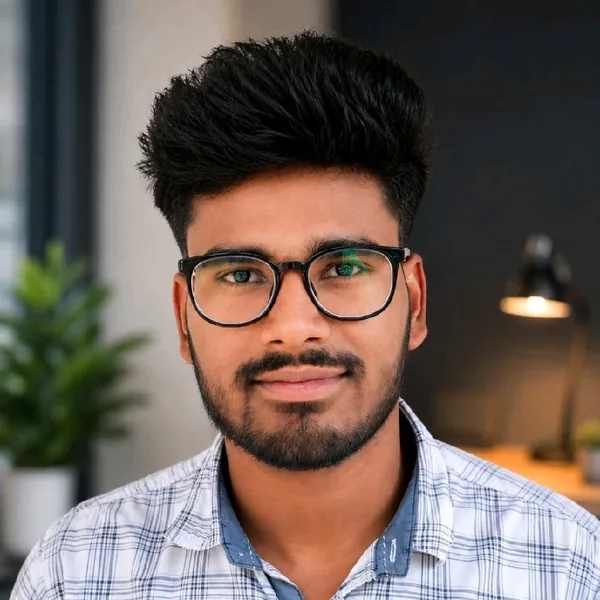
Taught by Ravi PandeyCEH and cyber security trainer, Unisoft Technologies
- Duration
4–5 monthsClassroom in Dharampeth or live online. Ask which batches are running. - Trainer
Ravi PandeyMeet him at a demo class before you join. - Start from
The basicsNetworking (TCP/IP), plus working comfort with Linux and Windows. - Finish with
A reportA forensic report on a practice case: the facts, the method and the evidence trail.
A course in its own right: you do not need the full Cyber Security course to join.
The job
What a digital forensic analyst does
A forensic analyst works out what happened on a computer, phone or network, and records it so others can rely on it. The work is to:
- Secure the evidence without changing it
- Make verified copies to work on
- Find out what was done, by whom and when
- Recover deleted or hidden data
- Keep a record of every step taken
- Report the facts clearly, for a manager or a court
The forensic process
- Identify
- Collect
- Preserve
- Analyse
- Report
Course outline
The Digital Forensics course, block by block
Twelve blocks in four parts, from the rules of evidence to a finished report. Each topic is learned, then practised on sample evidence in the lab.
Foundations and evidence
The principles of forensic work, and how evidence is collected without being changed.
01Digital forensics fundamentalsWhat forensics is, and how to set up for it
- What digital forensics is, and its main types
- Forensic readiness
- Chain of custody
- Collecting and preserving evidence
- The legal and ethical side of an investigation
- Setting up a forensic lab and an overview of the toolkit
02Acquiring and preserving evidenceMaking a copy you can rely on
- Taking a verified copy of a drive without changing the original
- Write blockers and hashing
- Imaging with FTK Imager
- Documenting what was collected
Operating systems and memory
What Windows and Linux machines record about their users, and what lives only in memory.
03Windows forensicsThe traces Windows leaves behind
- The NTFS file system and the registry
- Event logs, and the records of programs that have run
- Files, folders and the recycle bin
- Browser history, user activity and USB devices
- Recovering earlier versions of files
04Linux forensicsThe traces Linux leaves behind
- File systems (ext4 and XFS) and logs
- Shell history, scheduled jobs and SSH records
- User activity and package logs
- Containers (Docker): an overview
05Memory forensicsWhat only memory remembers
- Why memory matters, and how it is captured
- Analysing a memory image with Volatility
- Reading processes and network connections
- Spotting processes and code that should not be there
- Reporting memory findings
Networks, devices and the cloud
Following evidence across networks, phones, cloud services, databases and email.
06Network forensicsEvidence in the traffic
- Packet captures and how to read them
- Rebuilding sessions from web, DNS, email and file-transfer traffic
- Tracing data that left a network
- Wireless network forensics
07Mobile forensicsEvidence on a phone
- How Android and iOS store data
- Acquisition methods
- Reading app databases, messages, call logs and location records
- Free tools such as Autopsy
08Cloud forensicsEvidence in someone else’s data centre
- Logging and evidence on AWS, Azure and Google Cloud
- Cloud storage
- Cloud incident response
- Containers, Kubernetes and serverless: an overview
09Database and email forensicsEvidence in mailboxes and databases
- The basics of database forensics, with SQL Server and MySQL
- Email headers and email server records
- Outlook and Thunderbird data
- Recovering deleted email
Malware, tools and reporting
Understanding malicious software, choosing tools, and writing the report.
10Malware forensicsUnderstanding what a sample does
- Types of malware
- Static, dynamic and behavioural analysis in an isolated sandbox
- How malware hides, and how analysts see through it
- An introduction to reverse engineering
- Writing YARA rules and malware reports
11Forensic tools and techniquesChoosing and using the right tool
- Free and open-source tools: Autopsy, FTK Imager, Volatility, Wireshark, Eric Zimmerman’s tools, the SIFT Workstation and CAINE
- Commercial suites such as EnCase and X-Ways, explained as an overview
12Reporting and legal aspectsMaking the findings hold up
- Writing a forensic report and an executive summary
- Documenting how evidence was handled
- Presenting findings, including in court: the basics
- Indian law on electronic evidence and computer offences
This is the outline of the course. For the full topic list, message us on WhatsApp or book a demo class.
In the lab
The tools of a forensic lab
Hands-on work uses free, open-source tools; commercial suites such as EnCase and X-Ways are an overview.
- Autopsy
- FTK Imager
- Volatility
- Wireshark
- SIFT Workstation
- CAINE
- Eric Zimmerman’s tools
- YARA
You practise on sample evidence and lab machines, so every method can be repeated and checked, as it must be in real casework.
Evidence has rules
A finding is only as good as the way the evidence was handled
Forensic work may end up in front of a manager, an auditor or a court. So the method matters as much as the result:
- Work on a copy, never on the original
- Record every step, so another examiner can repeat it
- Keep an unbroken chain of custody
- Examine only what you are authorised to examine
- Keep what you find confidential
- Report the facts, and say what you do not know
The law in India: electronic records can be used as evidence under the Bharatiya Sakshya Adhiniyam, 2023, on conditions the law sets, and unauthorised access to a computer is an offence under the Information Technology Act, 2000. We teach the principles; for a real case, a lawyer advises.
Your trainer
Learn from Ravi Pandey
Ravi Pandey
CEH and cyber security faculty, Unisoft Technologies
Ravi teaches the CEH course at Unisoft, and ethical hacking on the Cyber Security course. He teaches this course too. Book a demo class and you can meet him before you join: see how he teaches, and ask him anything about the syllabus.
- Digital forensics
- Evidence handling
- Windows and Linux
- Memory and network
- Forensic reporting
His TryHackMe record
- Top 4%
- worldwide on TryHackMe
- 89
- hands-on rooms completed
- 19
- badges earned
- 667 days
- unbroken learning streak
As shown on his public profile on 9 October 2026; the figures change as he keeps practising. TryHackMe is a hands-on cyber security training platform, where each room is a practical lab. See his live profile
Who it is for
Who should take the Digital Forensics course, and where it can lead
The course can suit
- IT and computer science graduates
- System and network administrators
- Security and SOC staff
- Audit, compliance and risk professionals
- Students who have done CCNA, Network+ or Linux
- People moving into cyber security
Roles it can prepare you for
- Digital forensics analyst
- Incident response analyst
- Malware analyst (entry level)
- Investigation support analyst
- Security analyst
- Information security auditor
The exact role depends on your background, your experience and the skills you can demonstrate.
New to networking and Linux? Start there. Forensics assumes you know how networks, files and operating systems work. Our CCNA, Network+ and Red Hat Linux courses build that foundation. Ask us where to begin.
Next step
Book a Digital Forensics demo class
Leave your number and a counsellor will call you to fix a time. Meet Ravi, ask for the detailed syllabus, and find out which batch suits you.
- Meet Ravi Pandey, who will teach you
- Which of the three cyber courses, or the full Cyber Security course, suits you
- The current fee, duration and next batch, in the classroom or online
Visit us in Dharampeth
Unisoft Technologies, 2nd Floor, Prananand Building, West High Court Road, above Anand Bhandar, opposite Dress Code, Dharampeth, Nagpur 4400104.6 on Google from 1,600+ reviews · Directions and reviews
FAQ
Digital Forensics questions, answered
Can I take this course without the full Cyber Security course?
Yes. Digital Forensics is a course in its own right, so you can take it on its own. A counsellor can also tell you how it fits with our Cyber Security course.
How long is the course, and what does it cost?
The course runs for four to five months, in the classroom in Dharampeth or live online. The fee depends on your batch and mode; send an enquiry or call +91 95030 05060 for the current details.
What should I know before joining?
Networking basics (TCP/IP) and working comfort with Linux and Windows. If you are new to them, we will suggest where to start, for example our CCNA, Network+ or Red Hat Linux course.
Who teaches the course?
Ravi Pandey, Unisoft’s CEH and cyber security trainer. You can meet him at a demo class before you join. His profile
Is there a detailed syllabus?
Yes. This page shows the course outline. Ask a counsellor, or message us on WhatsApp, and we will send the full topic list.
Do you provide placement assistance?
Yes: resume preparation, interview preparation, mock interviews and relevant openings. It is assistance, not a job guarantee; selection depends on your skills, your interviews and the employer.
Do I need to buy forensic software?
No. The hands-on work uses free and open-source tools. Commercial suites such as EnCase and X-Ways are explained as an overview, and are not needed to take the course.
Does the course cover phones and the cloud?
Yes. Android and iOS forensics and the main cloud platforms are blocks of the course, alongside Windows, Linux, memory, network, database and email forensics.
Do I need to know programming?
No programming is needed to start. A little Python or PowerShell helps, and we point out where.
Will I get hands-on practice?
Yes. The course begins with building a forensic lab, and each block is practised on sample evidence in it.
Still have a question? Ask a counsellor about the course, the batches or the fee.